
Collaborative Reporting Software That Keeps Feedback on the Report
Design, govern, schedule, and embed pixel-perfect reports on infrastructure you own. Bold Reports natively supports your existing RDL files across Windows, Linux, Docker, and Kubernetes environments, including secure air-gapped deployments.
No credit card required.
Zero Extra Tools
Comments, permissions, and delivery in one platform
Every Action Logged
Access-controlled links and exportable activity logs
99.9%
Reporting your team can depend on, backed by an infrastructure SLA
Enterprise-grade security
SSO, role-based access, and audit trails built in from day one








Report Feedback Shouldn't Live in Six Different Places
When reports are shared as attachments and discussed over email, the conversation drifts away from the data. Decisions get made on stale versions, and no one can reconstruct why.
Feedback Gets Separated From the Report
A stakeholder spots a discrepancy and replies to the email that carried the attachment. That comment now lives in an inbox, not on the report, and the next person to open the report never sees it.
Nobody Knows Which Version Is Current
Exported copies circulate and get edited locally. Two people compare numbers from the same report and reach different conclusions because they are reading different exports.
Sharing a Report Means Oversharing Access
Granting someone access to review one report often means granting access to a folder, a workspace, or the wider reporting environment. Teams either overshare or stop sharing.
Approvals Happen Outside the System
Sign-off arrives as a message or a verbal confirmation. When an auditor asks who approved a figure and when, there is no record attached to the report itself.
Business Users Wait on IT to Distribute Reports
Recurring reports get sent manually, so delivery depends on someone remembering. When that person is out, stakeholders go without.
Cross-Team Context Disappears
An operations note from one shift, or a finance caveat on one line item, exists only in the head of whoever wrote the report. The next reader starts from zero.
Built to Keep Reporting Conversations Attached to the Data
Report commenting, role-based access permissions, and secure report sharing work as one layer, so collaboration doesn't require a second tool or a looser security posture.
No credit card required.
Feedback That Stays With the Report
Comments live on the report they refer to, so questions, answers, and caveats travel with the data instead of scattering across email threads and chat channels. Anyone opening the report later sees the full context.
Access You Can Scope Precisely
Role-based access permissions set view, edit, and interact rights per report, so a reviewer can comment and approve without ever getting edit rights. Sharing one report exposes exactly that report and nothing else.
Distribution That Runs Without Anyone Remembering
Scheduled email delivery sends the current version of a report to the right people on a set cadence, and secure links let external stakeholders open a report without an account in your reporting environment.
Everything Team Reporting Needs, in One Platform
From report commenting through secure report sharing and scheduled delivery, the collaboration workflow stays inside the reporting platform.

Report Commenting
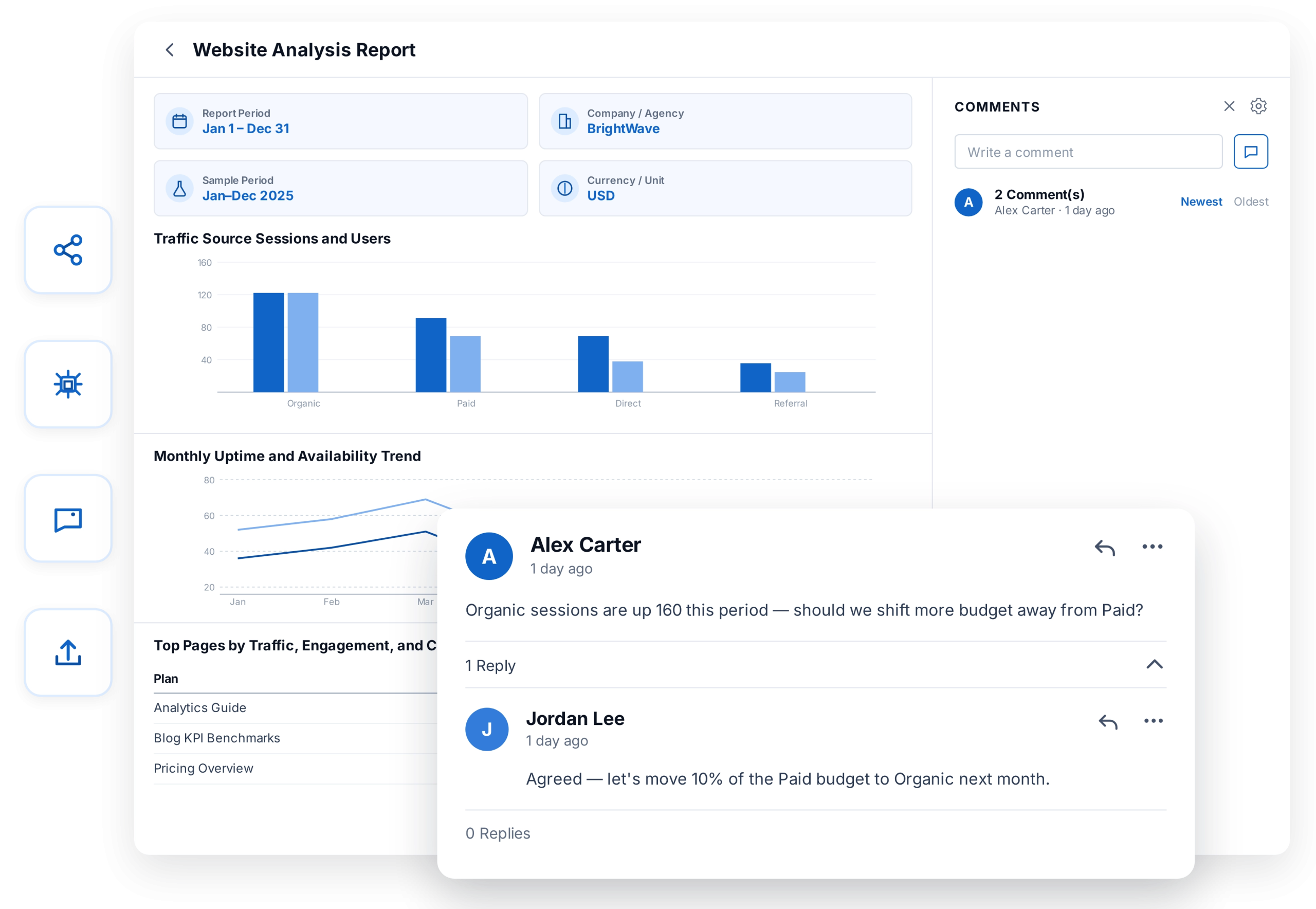
Add comments directly on a report so discussion happens where the data lives. Feedback stays attached to the exact report and version it refers to.

Threaded Replies
Reply to a comment using the reply icon, and reply more than once, so a review reads as one conversation instead of a set of disconnected notes. Comments accept pasted images alongside text.

Comment Notifications
When a comment is posted on a report, users who have enabled notifications get a system alert and an email, so feedback doesn't sit unread. Email settings are optional; collaboration works either way.

Role-Based Access Permissions
Assign view, edit, or interact rights per report. Reviewers can comment and approve without edit access, and sensitive reports stay scoped to the people who need them.

Team and Project-Level Access Management
Organize permissions by team or project instead of user by user, so access stays manageable as collaborator count grows across departments.

Scheduled Report Delivery
Set up recurring email delivery so stakeholders receive the current version of a report on a fixed cadence, with no manual send step.

Embed Reports in Existing Tools
Surface reports inside SharePoint, internal wikis, or your own application, so collaborators work with reports in the tools they already use daily.

Export for Sharing Outside the Platform
Export to PDF, Excel, Word, PowerPoint, CSV, and image formats when a report needs to travel into a deck, a printout, or an external hand-off.
How Bold Reports Handles Team Reporting Requirements
Compare how collaboration is typically handled across reporting approaches, from feedback capture through access control and delivery.
| Capability | File-Based Report Sharing | Traditional Reporting Tools | Bold Reports |
|---|---|---|---|
| Comments attached to the report | – | Varies by product | Native report commenting |
| Threaded discussion on a report | – | Limited | Supported |
| Per-report access permissions | Folder or file-level only | Often folder-level | View, edit, and interact per report |
| Secure report sharing, per report | Requires separate file controls | Varies | Access-controlled report links |
| Centralized authentication for collaborators | – | Varies by deployment | Azure AD, OAuth 2.0, OpenID Connect |
| Automated recurring delivery | Manual send | Often available | Scheduled email delivery |
| Audit trail of report activity | – | Varies | Activity logs, stored and exportable |
What Changes Once Report Collaboration Stops Being Manual
Here's what shifts across the business once feedback, access, and delivery all live with the report.
Reviewers leave feedback on the report itself, so the next person to open it sees the same discussion.
Report authors get consolidated feedback in one place instead of reconciling five email threads.
IT grants review access without widening permissions beyond the single report.
Stakeholders receive current reports automatically, so distribution no longer depends on one person remembering.
Auditors and compliance teams find report activity recorded rather than reconstructed after the fact.
Collaborators work with reports inside the tools they already use, without an extra login to manage.
How Teams Collaborate on Reports
The same reporting platform adapts to how each team already works, without a separate tool per department.

Finance Teams
Run budget reviews and month-end sign-off without a separate approval tool. Questions get routed to the right reviewer through report commenting, feedback stays on the report itself for whoever opens it next, and discrepancies surface during review rather than after a report reaches leadership.

Sales Teams
Share pipeline and performance reports with reps and leadership without exposing the full account list. Role-based access permissions mean reps see their own numbers while managers see the team's, comments replace a scheduling call to walk through a report, and a branded export or secure link covers stakeholders outside the platform.

Operations Teams
Keep cross-shift and cross-site reporting aligned without a handoff meeting. Comments carry notes from one shift or site to the next on the report itself, recurring reports reach the right people on schedule, and role-based permissions align access with who is on shift.

IT and Compliance
Keep collaboration auditable without loosening access control. One identity provider governs every collaborator through SSO, view, edit, and interact permissions are set per report rather than per folder, and activity logs can be exported whenever an audit asks for them.
Frequently Asked Questions
Collaborative reporting is an approach where multiple people review, discuss, and act on the same report inside the reporting platform rather than through exported copies. It typically combines report commenting, role-based access permissions, secure report sharing, and automated delivery, so feedback and decisions stay attached to the report they concern.
Report commenting lets users add comments directly on a report, so feedback and discussion stay attached to the exact report they refer to instead of living in a separate email or chat thread. Anyone who opens the report later sees the same context, including questions raised and answers given during review.
Sharing report files distributes static copies, so feedback happens outside the report and versions diverge as people save and edit locally. Collaborative reporting keeps one report as the source, with comments, permissions, and delivery managed centrally, so everyone reviews the same current version.
Yes. Any user with access to a report can add comments, and replies stay threaded so the conversation is easy to follow. Multiple reviewers can work through the same report without overwriting each other's feedback.
Bold Reports uses role-based access permissions to set view, edit, and interact rights per report. A reviewer can be given rights to comment and explore a report without the ability to change its definition, so review and authoring stay separate.
Yes. Bold Reports supports a range of directory systems and protocols including Azure Active Directory, OAuth 2.0, and OpenID Connect, so collaborator access is granted and revoked centrally alongside your other systems. This keeps report access aligned with role changes without maintaining a separate user list.
Yes. Reports are shared through access-controlled links, and you control who is able to open them. Access applies to the individual report rather than the surrounding folder or workspace, so sharing one report does not expose others.
Yes. Activity logs are stored, cannot be altered, and can be exported when needed, giving each report an audit trail rather than a reconstruction assembled from email after the fact. Compliance and audit teams get a record of who accessed and commented on a report.
Yes. Scheduled report delivery sends a report for recurring generation and email distribution, so stakeholders receive the current version on a set cadence. This removes the manual send step and the dependency on one person remembering to distribute a report.
Yes. Reports can be embedded in platforms such as SharePoint, internal wikis, or your own application, so collaborators view and discuss reports without switching tools or maintaining a separate login.
Reports can be exported to PDF, Microsoft Excel, Word, PowerPoint, CSV, and image formats. This covers cases where a report needs to move into a deck, a printout, or a hand-off to someone outside the reporting platform.
Bold Reports does not include a formal approval workflow with defined stages. What it does provide is comment threads on the report and role-based permissions, so a reviewer can be given view and comment rights without edit access and leave their feedback or confirmation on the report itself rather than in a message thread.
Reports can be shared with stakeholders as a secure, access-controlled link, and you control who is able to open it. Whether a given recipient needs an account depends on how your site's authentication and access settings are configured, so confirm the setup for your deployment.
Yes. Collaboration capabilities work consistently across cloud, private cloud, and on-premises deployments, so teams can choose a deployment model based on security and infrastructure requirements without changing how they collaborate.
Yes. Bold Reports supports enterprise requirements including centralized report management, role-based access control, auditability, multi-user collaboration, scheduling, and report delivery across departments, customers, and applications.
Yes. Bold Reports is free to try for 30 days, with no credit card required, so teams can evaluate report commenting, permissions, sharing, and scheduled delivery before purchasing.
Stop Rebuilding Report Context From Email Threads
Start a free trial and get your team commenting, reviewing, and approving on the report itself.
No credit card required.