
The Telerik Reporting alternative built on RDL
Bold Reports is a pixel-perfect .NET reporting platform that opens SSRS RDL and RDLC files natively. Designer, viewer, and report server ship as one platform, licensed by deployment, not by developer seat or CAL.








Why teams evaluate Telerik Reporting alternatives
Telerik Reporting is actively maintained by Progress and holds a strong position in the .NET tooling market. Teams evaluate alternatives when one of four constraints stops fitting, not because the product stopped working.
An existing RDL library has nowhere to land
Telerik's import wizard converts only from Crystal Reports, ActiveReports, and XtraReports, not RDL or RDLC. The SSRS request sits at Unplanned, so a 200-report estate means 200 rebuilds.
Managed report delivery is a separate SKU
Embedded reports are royalty-free and your end users need no licences. But management, scheduling, and self-service authoring need Telerik Report Server, with named-user CALs.
There is no vendor-managed hosting option
An Azure Marketplace image and Docker containers make deployment fast, but you still own and patch the VM. No first-party managed SaaS tier exists, in any edition or bundle.
Tenancy is an extension point, not a feature
A Custom Report Resolver and permission scoping make multi-tenancy achievable, not absent. But there is no per-tenant site, no per-tenant database, no built-in row filter.
Note: Bold Reports answers these to different degrees. On deployment the answer is short: Cloud Edition, an isolated Managed Private Cloud, or On-Premises. The same platform in all three.
Three reasons teams pick Bold Reports over Telerik Reporting
Faster to migrate, flexible to host, and multi-tenant by construction rather than by implementation.
No credit card required.

RDL reports import as they are
Bold Reports opens .rdl and .rdlc files natively, so layout, parameters, and data bindings survive the move intact.

Cloud, private cloud, or on-prem
Run it as managed SaaS, as an isolated private cloud we operate, or inside your own network. Same platform in all three.

Tenancy is built in, not built
Multi-site deployment and row-level security scope every report to its tenant, by separate database or shared schema.
Bold Reports vs Telerik Reporting: capability comparison
Both products are pixel-perfect, paginated reporting engines for the .NET stack with embeddable viewers and WYSIWYG design tools. The differences that matter in an evaluation are report format, licensing shape, deployment model, and how much multi-tenant architecture is prescribed versus left to you.
| Capability | Telerik Reporting | Bold Reports |
|---|---|---|
| Native report format | .trdp / .trdx XML, or CLR report classes | RDL and RDLC (SSRS-compatible) |
| Opens existing SSRS RDL files | Not supported; no SSRS/RDL converter | Yes, opens .rdl and .rdlc directly |
| Legacy converters provided | Crystal Reports, ActiveReports, XtraReports. Telerik documents these as helper utilities that do not guarantee one-to-one conversion | Crystal Reports to RDL converter utility, single-file and bulk (early access), plus Word and PowerPoint to RDL utilities; converted reports still need validation |
| Report designers | Visual Studio extension, standalone desktop designer, and browser-based Web Report Designer | Browser-based Web Report Designer, a Standalone Report Designer for Windows sold as a separate add-on (RDL and RDLC, deploys to Bold Report Server or Microsoft SSRS), and Report Writer for end users |
| Embedding SDKs | ASP.NET Core, MVC, Web Forms, Blazor, Angular, React, HTML5/JS, WPF, WinForms, WinUI | ASP.NET Core, MVC, Web Forms, Blazor, Angular, React, JavaScript, Vue (documented guides), WPF, UWP. No WinForms viewer, the WPF viewer hosts in WinForms via ElementHost |
| Blazor implementation | Native Blazor Report Viewer component | jQuery-based web viewer invoked through a boldreports-interop.js JS interop layer; works in Blazor Server and WebAssembly |
| Pixel-perfect paginated output | PDF, Excel, Word, PowerPoint, CSV, image and more | PDF, Excel, Word, PowerPoint, CSV, XML, HTML |
| Report management, scheduling, distribution | Telerik Report Server, a separately licensed product | Included in the platform across all editions |
| Developer licensing | Per developer, per year, with tiered support levels | No per-developer fee |
| End users of your embedded app | Royalty-free, no per-end-user licensing, no runtime fees | No per-user fee |
| Named users on the report server | Client Access Licenses, assigned to named users, not floating; 15 per instance, then bundles of 5. Guest-account preview and export are exempt | No per-user fee |
| Deployment models | Self-hosted: on-premises, your own cloud, Azure Marketplace VM image, or Docker containers. No first-party managed SaaS tier | Cloud Edition, Managed Private Cloud, or On-Premises Edition |
| Multi-tenancy | Achievable via Custom Report Resolver and permission scoping; tenancy is not a product construct, no per-tenant site or database | Multi-site deployment, either with a separate database per site or with multiple sites on a shared database scoped by row-level security. RLS filters report data by role, attribute, or tenant ID |
| White-label / branding control | WhiteLabeling on Report Server since R1 2017, plus viewer themes and skinning and a full REST API | Per-tenant logos, themes, layouts, and custom domains |
| Parent company | Progress Software (Nasdaq: PRGS) | Syncfusion |
| Capability | Telerik Reporting | Bold Reports |
|---|---|---|
| Native report format | .trdp / .trdx XML, or CLR report classes | RDL and RDLC (SSRS-compatible) |
| Opens existing SSRS RDL files | Not supported; no SSRS/RDL converter | Yes, opens .rdl and .rdlc directly |
| Legacy converters provided | Crystal Reports, ActiveReports, XtraReports. Telerik documents these as helper utilities that do not guarantee one-to-one conversion | Crystal Reports to RDL converter utility, single-file and bulk (early access), plus Word and PowerPoint to RDL utilities; converted reports still need validation |
| Report designers | Visual Studio extension, standalone desktop designer, and browser-based Web Report Designer | Browser-based Web Report Designer, a Standalone Report Designer for Windows sold as a separate add-on (RDL and RDLC, deploys to Bold Report Server or Microsoft SSRS), and Report Writer for end users |
| Pixel-perfect paginated output | PDF, Excel, Word, PowerPoint, CSV, image and more | PDF, Excel, Word, PowerPoint, CSV, XML, HTML |
| Parent company | Progress Software (Nasdaq: PRGS) | Syncfusion |
| Capability | Telerik Reporting | Bold Reports |
|---|---|---|
| Embedding SDKs | ASP.NET Core, MVC, Web Forms, Blazor, Angular, React, HTML5/JS, WPF, WinForms, WinUI | ASP.NET Core, MVC, Web Forms, Blazor, Angular, React, JavaScript, Vue (documented guides), WPF, UWP. No WinForms viewer, the WPF viewer hosts in WinForms via ElementHost |
| Blazor implementation | Native Blazor Report Viewer component | jQuery-based web viewer invoked through a boldreports-interop.js JS interop layer; works in Blazor Server and WebAssembly |
| Multi-tenancy | Achievable via Custom Report Resolver and permission scoping; tenancy is not a product construct, no per-tenant site or database | Multi-site deployment, either with a separate database per site or with multiple sites on a shared database scoped by row-level security. RLS filters report data by role, attribute, or tenant ID |
| White-label / branding control | WhiteLabeling on Report Server since R1 2017, plus viewer themes and skinning and a full REST API | Per-tenant logos, themes, layouts, and custom domains |
| Parent company | Progress Software (Nasdaq: PRGS) | Syncfusion |
| Capability | Telerik Reporting | Bold Reports |
|---|---|---|
| Report management, scheduling, distribution | Telerik Report Server, a separately licensed product | Included in the platform across all editions |
| Developer licensing | Per developer, per year, with tiered support levels | No per-developer fee |
| End users of your embedded app | Royalty-free, no per-end-user licensing, no runtime fees | No per-user fee |
| Named users on the report server | Client Access Licenses, assigned to named users, not floating; 15 per instance, then bundles of 5. Guest-account preview and export are exempt | No per-user fee |
| Deployment models | Self-hosted: on-premises, your own cloud, Azure Marketplace VM image, or Docker containers. No first-party managed SaaS tier | Cloud Edition, Managed Private Cloud, or On-Premises Edition |
| Parent company | Progress Software (Nasdaq: PRGS) | Syncfusion |
-
Compiled from both vendors' public documentation, pricing, and support forums, August 2026. Capabilities vary by edition and contract on both sides, confirm current terms before you rely on them. Telerik and Progress are trademarks of Progress Software Corporation. Telerik Reporting product page.
How the two licensing models differ
One meters by headcount. The other meters by deployment. That single difference decides which is cheaper for you.
Bold Reports: one platform, priced by deployment
No per-developer fees. No per-user fees.
Quoted against deployment model and scale.
Adding developers costs nothing. Adding report consumers costs nothing. Bold Reports' pricing page states it plainly, and quotes against deployment model and scale instead. What that covers is the platform itself, identical in every edition:
-
Web report designer and viewer
-
Report server, scheduling, and version history
-
25+ data connectors with built-in ETL
-
Multi-tenancy and row-level security
-
White-labeling and custom domains
The capability set does not change between Cloud, Managed Private Cloud, and On-Premises, you choose a deployment, not a feature tier. Turning on self-service reporting for a thousand business users is a configuration change, not a second purchase order. (The Windows Standalone Report Designer is a separate add-on.)
Telerik: developer seats, plus a second product for delivery
Telerik Reporting is licensed per developer per year, and its embedded distribution is royalty-free, your application's end users need no licenses and there are no runtime fees. For pure embedding, that model is genuinely competitive.
Report management, scheduling, and self-service authoring are a separate product. Telerik Report Server is licensed per instance and adds named-user Client Access Licenses for administrators, report editors, and authenticated viewers. It ships inside DevCraft Ultimate, the economical route if you already buy the full Telerik suite.
So the question is whether you need managed delivery. If you only embed a fixed set of reports, Telerik's royalty-free model is hard to beat on price, and you would be switching for the RDL path or the hosting options rather than the licensing. If you want scheduled delivery, a managed report portal, or self-service authoring for a growing named audience, that is a second Telerik SKU metered per person, and it is already inside every Bold Reports edition.
No pricing figures appear on this page by choice. Terms change, and a stale number is worse than none. Pull current rates from Telerik's pricing page and Bold Reports pricing before any budget conversation.
For SaaS and ISV teams embedding reporting in a product
If you ship reports to your customers rather than your colleagues, two things decide the build: how tenants are isolated, and what each new customer costs you.
Tenant isolation is configuration, not construction
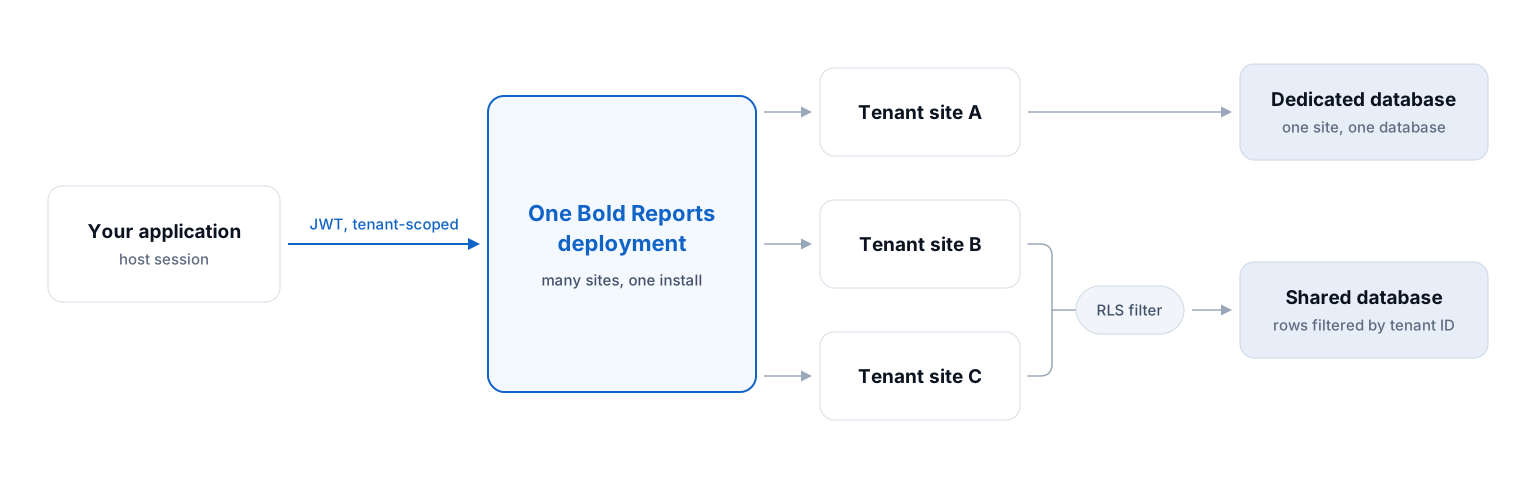
Bold Reports runs many sites from one deployment, each with its own database, or several sharing a database scoped by row-level security. RLS filters by role, attribute, or tenant ID, so one report definition returns only the rows a tenant is entitled to. That distinction matters most when a security review asks you to demonstrate isolation.
White-labeling goes past the viewer chrome
Each tenant gets its own logo, theme, layout, and custom domain, and the embedded designer exposes APIs for branding, workflow, and permissions, so the authoring surface inside your product looks like your product. See white-label reporting for SaaS.
Embedding is token-based
JWT authentication gives password-free, tenant-scoped access, so your application's existing session is the source of truth rather than a second login your customers have to manage.
On cost, know which product you are pricing
Telerik's embedded distribution is royalty-free, so for a fixed set of operational reports it is hard to beat and you would be switching for the RDL path or the hosting options, not the price. The moment you offer customers self-service authoring or scheduled delivery, that becomes Telerik Report Server with named-user CALs, and it is already in every Bold Reports edition.
For enterprise reporting teams
Enterprise evaluations turn on deployment control, governance, and what happens to the reports you already have.

Run it, or have it run for you
Cloud Edition, an isolated Managed Private Cloud we operate, or On-Premises inside your own network, the same platform in all three.

One place to govern all of it
Role-based access, row-level security, scheduling, delivery, and version history are administered centrally, not assembled across two products.

Business users, without a purchase
Analysts author and edit in the browser designer and Report Writer, and enabling them is a permission change rather than a licensing decision.
Your existing report estate decides the project size
Most large .NET organizations hold an RDL inventory: live SSRS instances, RDLC files compiled into applications, reports inherited through acquisitions. Bold Reports opens those directly, so migration becomes re-pointing connections and validating output rather than re-authoring designs. Reports authored natively in Telerik's .trdx format or as CLR classes still have to be rebuilt. The format advantage applies to your RDL estate, not to reports that were never RDL.
SSRS RDL
opens directly →
opens directly ↓
SSRS RDL
RDLC
opens directly →
opens directly ↓
Bold Reports, no rebuild
Telerik .trdx / CLR
rebuild required →
rebuild required ↓
New development, estimate it as such
For .NET application teams
For teams whose question is simply "can I drop this into my app," the answer is the same shape as Telerik's: a server-side rendering engine plus a per-framework viewer component.
@page "/reports"
@inject IJSRuntime JS

<div id="viewer" style="height:650px"></div>

@code {
    protected override async Task OnAfterRenderAsync(bool firstRender)
    {
        if (!firstRender) return;
        await JS.InvokeVoidAsync("boldReports.renderViewer", new {
            reportServiceUrl = "/api/BoldReports",
            reportPath = "~/Resources/sales-summary.rdl",
            processingMode = "Remote"
        });
    }
}

// wwwroot/boldreports-interop.js
// window.boldReports = { renderViewer: o => $("#viewer").boldReportViewer(o) };@addTagHelper *, BoldReports.AspNet.Core
<bold-report-viewer id="viewer"
report-service-url="/api/BoldReports"
report-path="~/Resources/sales-summary.rdl"
processing-mode="Remote">
</bold-report-viewer>
// Controllers/BoldReportsController.cs
[Route("api/[controller]")]
public class BoldReportsController : Controller, IReportController
{
public object PostReportAction([FromBody] Dictionary<string, object> data)
=> ReportHelper.ProcessReport(data, this, this.memoryCache);
}import '@boldreports/javascript-reporting-controls/Scripts/bold.report-viewer.min';
import '@boldreports/javascript-reporting-controls/Content/material/bold.reports.all.min.css';
import { BoldReportViewerModule } from '@boldreports/angular-reporting-components';
<!-- report-viewer.component.html -->
<bold-reportviewer id="viewer"
[reportServiceUrl]="serviceUrl"
[reportPath]="reportPath"
[processingMode]="'Remote'">
</bold-reportviewer>
// report-viewer.component.ts
serviceUrl = '/api/BoldReports';
reportPath = '~/Resources/sales-summary.rdl';import '@boldreports/javascript-reporting-controls/Scripts/bold.report-viewer.min';
import '@boldreports/javascript-reporting-controls/Content/material/bold.reports.all.min.css';
import { BoldReportViewerComponent } from '@boldreports/react-reporting-components';
export default function SalesReport() {
return (
<BoldReportViewerComponent
id="viewer"
reportServiceUrl="/api/BoldReports"
reportPath="~/Resources/sales-summary.rdl"
processingMode="Remote"
/>
);
}<link href="bold.reports.all.min.css" rel="stylesheet" />
<script src="jquery.min.js"></script>
<script src="bold.reports.common.min.js"></script>
<script src="bold.report-viewer.min.js"></script>
<div id="viewer" style="height:650px"></div>
<script>
$(function () {
$("#viewer").boldReportViewer({
reportServiceUrl: "/api/BoldReports",
reportPath: "~/Resources/sales-summary.rdl",
processingMode: "Remote"
});
});
</script>-
Full viewer and designer documentation for every framework above.
Reports render server-side
Generation and export happen on the server, so large paginated exports don't depend on client memory or block the browser.
Components across the .NET and JavaScript stack
Viewer and designer components ship for ASP.NET Core, ASP.NET MVC, ASP.NET Web Forms, Blazor, Angular, React, JavaScript, WPF, and UWP, with the web targets distributed as the @boldreports/javascript-reporting-controls npm package. Vue has documented integration guides for both the viewer and the designer.
The web viewer is jQuery-based, and Blazor goes through JS interop
Setup in Blazor Server or WebAssembly means referencing the Bold Reports scripts and styles plus a small boldreports-interop.js file, invoked via IJSRuntime. It is documented and works in both hosting models, but if you want a viewer authored natively in Blazor with no JavaScript in your project, Telerik ships one and we do not. Weigh that if your team has a no-interop policy.
Authoring runs in the browser or on the desktop
Alongside the web designer, a Standalone Report Designer, licensed as a separate add-on, installs on Windows for offline RDL and RDLC authoring, with a visual query builder and connections to SQL Server, Oracle, OLEDB, ODBC, XML, and Web API. Reports it produces deploy to Bold Report Server or to Microsoft SSRS, so teams that still run SSRS can author in it during a phased migration.
RDL is a portable format, and that cuts both ways.
Report definitions in RDL are readable XML that other RDL-compatible tooling can open. That is an argument for RDL as a format choice independent of vendor: it lowers the cost of your next migration, including one away from us.
Honest note on desktop viewer components
Telerik provides WinForms and WinUI viewers for embedding into desktop applications. Bold Reports ships WPF and UWP; there is no dedicated WinForms viewer, though the WPF viewer can be hosted inside a WinForms application through ElementHost. If WinForms or WinUI is load-bearing for a desktop client you still ship, confirm the fit before planning a move.
What migrating from Telerik Reporting actually involves
Effort splits by where each report came from. Inventory that split first, it sizes the whole project.
What we won't claim
There is no button that converts a .trdx file. Any vendor promising an automatic Telerik migration is describing the RDL half and omitting the other. Ask us to size both buckets against your real inventory before you commit to a date.
Sort into two buckets
Anything that began as RDL or RDLC imports directly, including estates still running on an SSRS alternative path. Anything authored as .trdx or a CLR class gets rebuilt. That ratio is your project size.
Import and re-point
Import the RDL bucket, then re-point data connections to your environment. The files open as they are; the connections are what you change. Follow the step-by-step RDL migration guide.
Validate against production data
Check page breaks, group headers, parameter behaviour, and PDF and Excel fidelity. This is where the hours go, not the import.
Rebuild the Telerik-native bucket
Estimate .trdx and CLR reports as new development. Consolidate near-duplicates here rather than porting them one-for-one.
Swap the viewer, then cut over
On ASP.NET Core, Blazor, Angular, or React this is a component and endpoint change. Run both through one month-end first.
When Telerik Reporting is still the right call
A short list, so you can disqualify us early instead of late.
You already license DevCraft.
Reporting is near-marginal cost inside Complete or Ultimate, and Ultimate bundles Report Server.
Your estate is Telerik-native.
No RDL library means no import advantage; .trdx and CLR reports get rebuilt either way.
You need WinForms, WinUI, or native Blazor.
Telerik ships viewers for all three. We ship WPF and UWP, and reach Blazor through JS interop.
You author reports in Visual Studio.
CLR report classes let you version reports as code. Bold Reports authoring is designer-led.
You have an RDL estate to keep.
.rdl and .rdlc open directly, so migration is re-pointing and validation, not re-authoring.
Your report consumers are customers.
Managed delivery and self-service are in every edition, with no named-user seat to buy.
You would rather not run it yourself.
Cloud Edition or an isolated Managed Private Cloud we operate. On-Premises if you prefer.
You must evidence tenant isolation.
Per-site databases, or a shared database scoped by row-level security, as a product construct.
Questions this page hasn't answered yet
It depends on your report format. If you hold an SSRS RDL or RDLC library, Bold Reports opens those files natively and skips the re-authoring project a Telerik-format-only tool requires. Other credible options are DevExpress Reporting, MESCIUS ActiveReports, Stimulsoft, and FastReport. Compare on format compatibility, licensing axis, and deployment model.
No. Telerik uses its own .trdp / .trdx format or CLR report classes, and its Import Report Wizard converts only from Crystal Reports, ActiveReports, and XtraReports. RDL, RDLC, and SSRS appear nowhere in Telerik's import documentation, and the SSRS conversion request is marked Unplanned on Telerik's feedback portal.
Yes. RDL and RDLC are native formats in Bold Reports, so .rdl and .rdlc files open directly with layout, parameters, and data-source bindings intact. Most need their connections re-pointed and their output validated, not redesigned.
Yes. Reports created as .trdx files or CLR report classes must be rebuilt, because the formats do not interoperate. Inventory by origin before you estimate: the RDL bucket imports, the Telerik-native bucket is new development.
They meter differently. Telerik Reporting is licensed per developer per year, with royalty-free embedded distribution, your end users need no licenses and there are no runtime fees. Telerik Report Server is a separate per-instance purchase that adds named-user Client Access Licenses. Bold Reports charges no per-developer or per-user fee and quotes on deployment model and scale. Close for pure embedding; divergent for self-service at scale.
No. Telerik Reporting includes royalty-free runtime distribution: end users of your application need no licensing and no runtime fees apply. Client Access Licenses belong to Telerik Report Server, not to Telerik Reporting, they cover named users who manage assets, edit in the designers, use a server-connected viewer, or call its APIs. Guest-account preview and export consume none.
Largely, with differences at the edges. Both ship viewers for ASP.NET Core, MVC, Web Forms, Blazor, Angular, React, and JavaScript, and Bold Reports publishes Vue integration guides for both the viewer and the designer. Telerik adds WinForms, WinUI, and a native Blazor viewer; Bold Reports adds UWP and reaches Blazor through JS interop. Confirm your specific target before committing.
Yes. Multi-site deployment gives each site its own database, or lets several sites share one database scoped by row-level security, which filters by role, attribute, or tenant ID. Embedded access uses tenant-scoped JWT authentication. Telerik supports multi-tenancy too, via a Custom Report Resolver and server permission scoping, but as a pattern you implement, not a construct it ships.
Yes. Bold Reports offers a self-hosted On-Premises Edition, a vendor-managed Cloud Edition, and a Managed Private Cloud in an isolated environment, the same platform in each. Telerik is self-hosted only, with no first-party managed-SaaS tier.
Bring one real RDL file and settle it in an afternoon
The fastest way to evaluate a Telerik Reporting alternative is to start a trial, upload an RDL report, and review the results. If your reports are Telerik-native, we'll assess the rebuild effort honestly.