






Trusted by leading companies

J&J

Schneider

Bridgestone

Siemens

Verizon

HP

Fidelity

Intel

Core Capabilities

Everything a modern report viewer should do

Every Bold Reports viewer shares the same JavaScript foundation, so the experience stays consistent whether it's embedded in a React or Angular SPA or a .NET application.

Runtime experience

What your end users touch

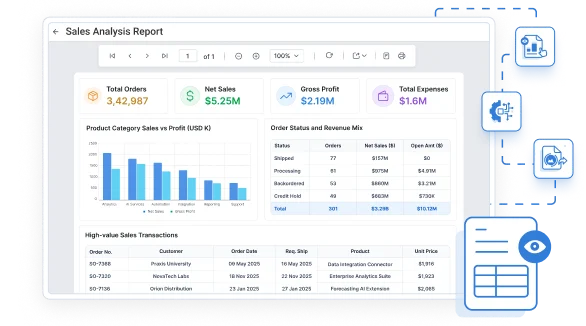
Opens a finished report, applies parameters, drills into detail, and exports the result, the runtime experience inside your application.

Flexible hosting

Works with or without a report server

View RDL and RDLC reports with or without connecting to Microsoft SSRS or Bold Report Server, including reports stored locally or embedded directly in your application.

Embedded Tools Setup · Developer & .NET

Native Viewer Component

Each framework gets a purpose-built viewer component with the same toolbar, parameters, and export behavior underneath, so setup takes minutes.

  • Renders RDL/RDLC reports with a native component per framework.
  • Same toolbar, parameters, and export options across every platform.
  • Set the report path, service URL, and auth token, with no extra plumbing.
  • Ready in a few lines of code, not a separate deployment.
Copy to clipboard
<div id="viewer"></div>
 
<script>
$(function () {
  $("#viewer").boldReportViewer({
    reportServiceUrl: "https://your-domain.com/reporting/reportservice/api/Viewer",
    reportServerUrl: "https://your-domain.com/reporting/api/site/site1",
    serviceAuthorizationToken: "Bearer YOUR_SERVER_TOKEN",
    reportPath: "/Sample Reports/Company Sales"
  });
});
</script>
Copy to clipboard
<bold-reportviewer
  [reportServiceUrl]="reportServiceUrl"
  [reportServerUrl]="reportServerUrl"
  [serviceAuthorizationToken]="serviceAuthorizationToken"
  [reportPath]="reportPath">
</bold-reportviewer>

// component.ts
reportServiceUrl = 'https://your-domain.com/reporting/reportservice/api/Viewer';
reportServerUrl = 'https://your-domain.com/reporting/api/site/site1';
serviceAuthorizationToken = 'Bearer YOUR_SERVER_TOKEN';
reportPath = '/Sample Reports/Company Sales';
Copy to clipboard
import { BoldReportViewerComponent } from '@boldreports/react-reporting-components';

function App() {
  return (
    <div style={{ width: "100%", height: "900px" }}>
      <BoldReportViewerComponent
        reportServiceUrl="https://your-domain.com/reporting/reportservice/api/Viewer"
        reportServerUrl="https://your-domain.com/reporting/api/site/site1"
        serviceAuthorizationToken="Bearer YOUR_SERVER_TOKEN"
        reportPath="/Sample Reports/Company Sales">
      </BoldReportViewerComponent>
    </div>
  );
}
Copy to clipboard
<bold-report-viewer
  report-service-url="https://your-domain.com/reporting/reportservice/api/Viewer"
  report-server-url="https://your-domain.com/reporting/api/site/site1"
  report-path="/Sample Reports/Company Sales"
  service-authorization-token="Bearer YOUR_SERVER_TOKEN">
</bold-report-viewer>

// _ViewImports.cshtml
@addTagHelper *, BoldReports.AspNet.Core
Copy to clipboard
// Blazor Component
public async void RenderReportViewer()
{
    viewerOptions.ReportPath = "/Sample Reports/Sales Order Detail";
    viewerOptions.ServiceURL = "https://your-domain.com/reporting/reportservice/api/Viewer";
    viewerOptions.ServerURL = "https://your-domain.com/reporting/api/site/site1";
    viewerOptions.AuthorizationToken = "Bearer YOUR_SERVER_TOKEN";
    await JSRuntime.InvokeVoidAsync("BoldReports.RenderViewer", "report-viewer", viewerOptions);
}

// JS Interop (wwwroot/js/site.js)
window.BoldReports = {
    RenderViewer: function (elementID, reportViewerOptions) {
        $("#" + elementID).boldReportViewer({
            reportPath: reportViewerOptions.reportPath,
            reportServiceUrl: reportViewerOptions.serviceURL,
            reportServerUrl: reportViewerOptions.serverURL,
            serviceAuthorizationToken: reportViewerOptions.authorizationToken
        });
    }
};

<div id="report-viewer" style="width:100%;height:900px"></div>
Copy to clipboard
@(Html.Bold().ReportViewer("viewer")
  .ServiceAuthorizationToken("Bearer YOUR_SERVER_TOKEN")
  .ReportServiceUrl("https://your-domain.com/reporting/reportservice/api/Viewer")
  .ReportServerUrl("https://your-domain.com/reporting/api/site/site1")
  .ReportPath("/Sample Reports/Company Sales")
)
Copy to clipboard
<div style="height:600px;width:100%">
<Bold:ReportViewer runat="server"
    ServiceAuthorizationToken="Bearer YOUR_SERVER_TOKEN"
    ReportServiceUrl="https://your-domain.com/reporting/reportservice/api/Viewer"
    ReportServerUrl="https://your-domain.com/reporting/api/site/site1"
    ReportPath="/Sample Reports/Company Sales">
</Bold:ReportViewer>
</div>
Core Capabilities

Everything a modern report viewer should do

Every Bold Reports viewer shares the same capabilities, so the experience stays consistent whether it's embedded in a React SPA or an ASP.NET MVC app.

Use Cases

What you can do with the report viewer

The same component adapts to a wide range of reporting scenarios, from customer-facing reports to internal operational reporting.

embed customer facing reports
customer-facing-reporting

Give your SaaS customers a native, branded reporting experience inside your product, without sending them to a separate reporting tool.

Invoice Statements
invoice-and-statement-delivery

Render pixel-perfect, print-ready invoices, receipts, and statements that stay consistent whether viewed on screen or exported to PDF.

Operational Reports
operational-reporting

Give teams a self-serve way to view sales, inventory, and finance reports with parameters and drill-down instead of static spreadsheets.

SSRS Crystal viewers
legacy-report-viewer-replacement

Keep your existing RDL/RDLC reports and swap out an aging viewer for a modern, web-based one, with no report rebuild required.

customizable-report-viewer
Brand the viewer to match your app

Restyle the toolbar, themes, and UI to match your product, so the viewer looks native rather than embedded.

desktop-reporting-support
Add reporting to desktop applications

Bring the same RDL/RDLC viewing experience to WPF and UWP desktop apps alongside your web products.


The Bigger Picture

Report Viewer is one part of the embedded reporting toolkit

Four embedded reporting tools that work together to design, view, manage, and deliver reports from a single platform.

Enterprise-Ready Compliance

Bold Reports helps you meet key security and compliance standards. All activity logs are safely stored, can’t be changed, and are easy to export when needed.

soc-2-type-ii-compliance
iso-27001-certified
gdpr-compliant
hipaa-compliant

Enterprise-Ready Compliance

Bold Reports helps you meet key security and compliance standards. All activity logs are safely stored, can’t be changed, and are easy to export when needed.

soc-2-type-ii-compliance
iso-27001-certified
gdpr-compliant
hipaa-compliant
Get the Details You Need

Frequently Asked Questions

A report viewer is a UI component that renders reports inside a web or desktop app — so instead of building report rendering, export, and print handling yourself, you embed a ready-made component and let users view, filter, print, and export directly in your application. Formats range from proprietary ones like Crystal's .rpt to open standards, the most popular being RDL (popularized by SSRS) and its .NET counterpart RDLC.

A report designer is a design-time tool for building and editing report layouts — arranging data regions, formatting, parameters, and expressions. A report viewer is the runtime component users interact with to open, explore, filter, and export a finished report. In short: the designer creates reports, the viewer displays them.

Bold Reports ships report viewer components for Angular, React, JavaScript, ASP.NET Core, ASP.NET MVC, ASP.NET Web Forms, Blazor, WPF, and UWP — each with its own integration package and full documentation.

The viewer renders native RDL and RDLC definitions, so most existing SSRS reports upload and run as-is — you reconnect the data source and they render. Reports relying on custom extensions or SSRS-server-specific features are identified up front during migration.

PDF, Word, Excel, PowerPoint, CSV, XML, and HTML, with pixel-perfect formatting preserved across every format.

Yes, Bold Reports is free to try for 30 days, no credit card required.

Crystal Reports .rpt files use SAP's proprietary format, so they're converted to RDL before rendering. Bold Reports provides a Crystal-to-RDL conversion tool that automates this — it processes your .rpt reports and generates RDL equivalents, carrying across layout and formatting so you're not rebuilding by hand.

Yes. You can show, hide, rearrange, or add custom toolbar items, and apply a Material, Bootstrap, Fabric, or high-contrast theme — or override the CSS to match your application's branding. See Toolbar customization and Theming in the docs for the full API.

The viewer renders on demand, page by page — only the requested page is processed and streamed rather than the whole report at once, so load time stays roughly flat as report size grows. For example, a 5,000-row financial statement that paginates into 200 pages loads the first page in about the same time as a 10-page report, because the viewer isn't rendering all 200 pages up front. See On-demand paging in the docs for configuration details.

Yes. Row-level security and role-based access control are built-in — access rules bind to roles or group membership, so one report definition serves everyone while each user sees only their authorized rows. Because the viewer also renders whatever dataset it's passed, you can enforce additional filtering in your own data layer before rendering.

Ready to add report viewing to your application?

Embed a report viewer that feels like a native part of your application, fully branded and easy to use.