






Business reporting simplified

Energy Reporting Solutions

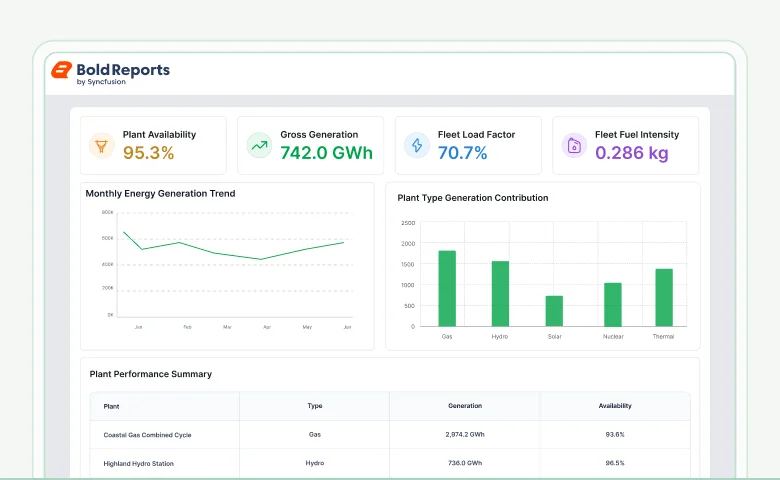
Energy Reporting Software for Plant and Operations Performance. Create pixel-perfect energy reports for power generation output, plant efficiency, downtime evaluation, and recurring utility reporting workflows with enterprise reporting access. 

  • Compare generation and efficiency KPIs.
  • Evaluate downtime by unit.
  • Review plant output summaries.
  • Deliver periodic operations reports.
Trusted by leading companies

J&J

Schneider

Bridgestone

Siemens

Verizon

HP

Fidelity

Intel

Key modernization advantages

Core benefits

Energy reporting for generation reviews, outage management, usage evaluation, and asset upkeep with automated distribution, structured delivery, and enterprise-ready reporting workflows. 

Utility reporting structure

Utility reporting structure

Prepare recurring energy documents for plant activity, service continuity, and generation performance reviews.

Site document precision

Site document precision

Create pixel-perfect reports for outage reviews, generation meetings, and operational assessments.

Automated operational distribution

Automated operational distribution

Deliver energy reports sharable to dispatch units, and leadership through scheduled reporting workflows.

Built for teams

Who can use this

Energy reporting software helps plant leadership and operations teams prepare structured reporting for generation, efficiency, and downtime workflows. Bold Reports supports recurring reporting across utility operations and energy facilities. 

Plant managers
Plant managers

Review generation output, unit efficiency, downtime patterns, and performance summaries.

Energy analyst
Energy analysts

Evaluate production ratios, efficiency measures, and outage trends across facilities.

Operations teams
Operations teams

Assess shift-level plant activity, equipment stoppages, and recurring operational reports.

Maintenance supervisors

Prepare equipment performance reports for service planning coordination.

No credit card required.

Real-world reporting scenarios

Explore key use cases

Energy reporting software supports generation reporting, efficiency evaluation, and downtime reporting across utility environments for plant reviews, shift operations, and performance assessment.

Plant output

Gain visibility into power generation levels across facilities to support production planning and performance reviews.

  • Track generation levels across plants and individual units clearly.
  • Analyze output trends across defined reporting periods.
  • Examine supply and demand variations across operational cycles.
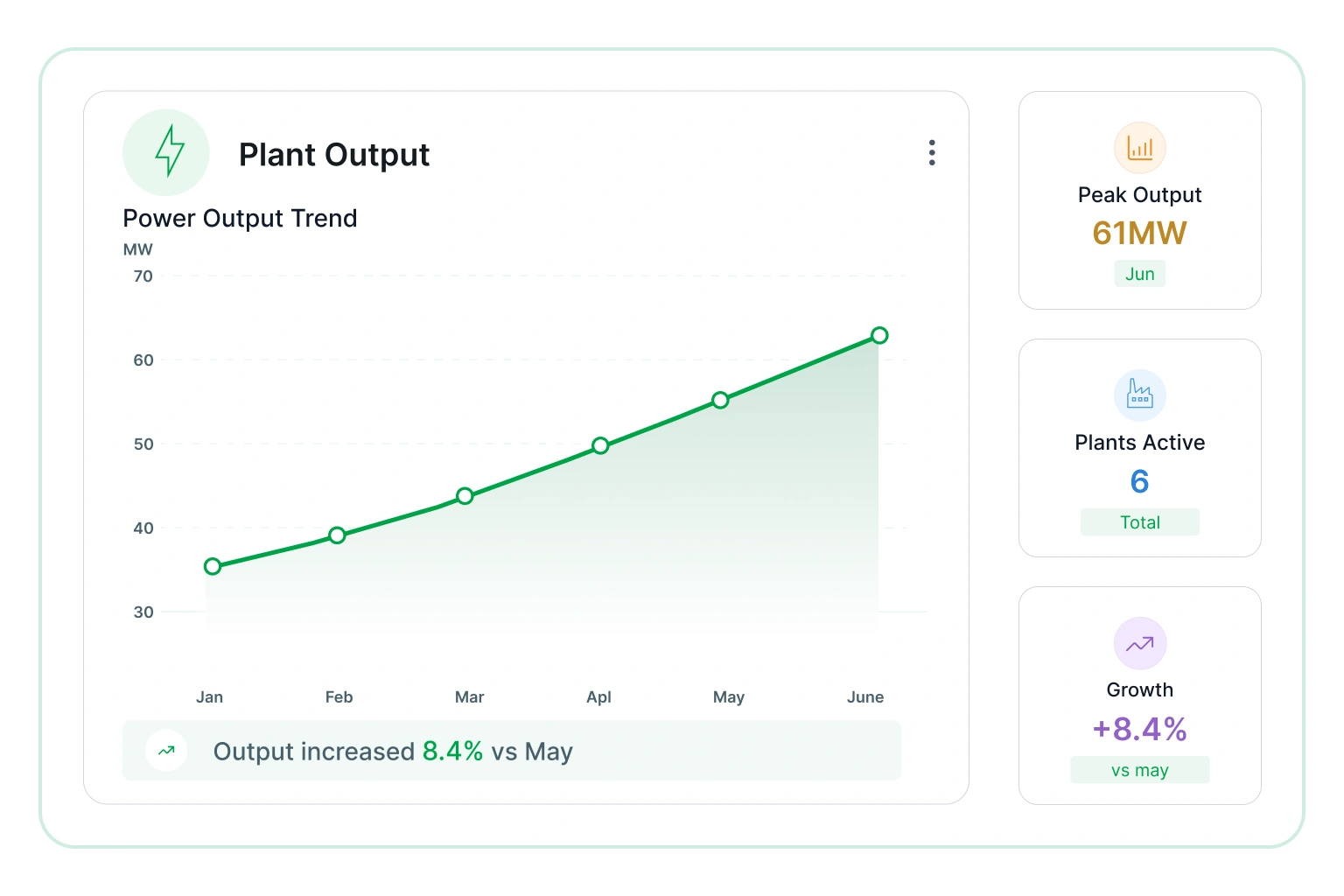
Plant output

Efficiency review

Understand operational effectiveness by examining energy conversion, resource utilization, and process performance.

  • Measure efficiency across generation units and processes.
  • dentify areas of energy loss and improvement opportunities.
  • Assess performance against defined operational benchmarks.
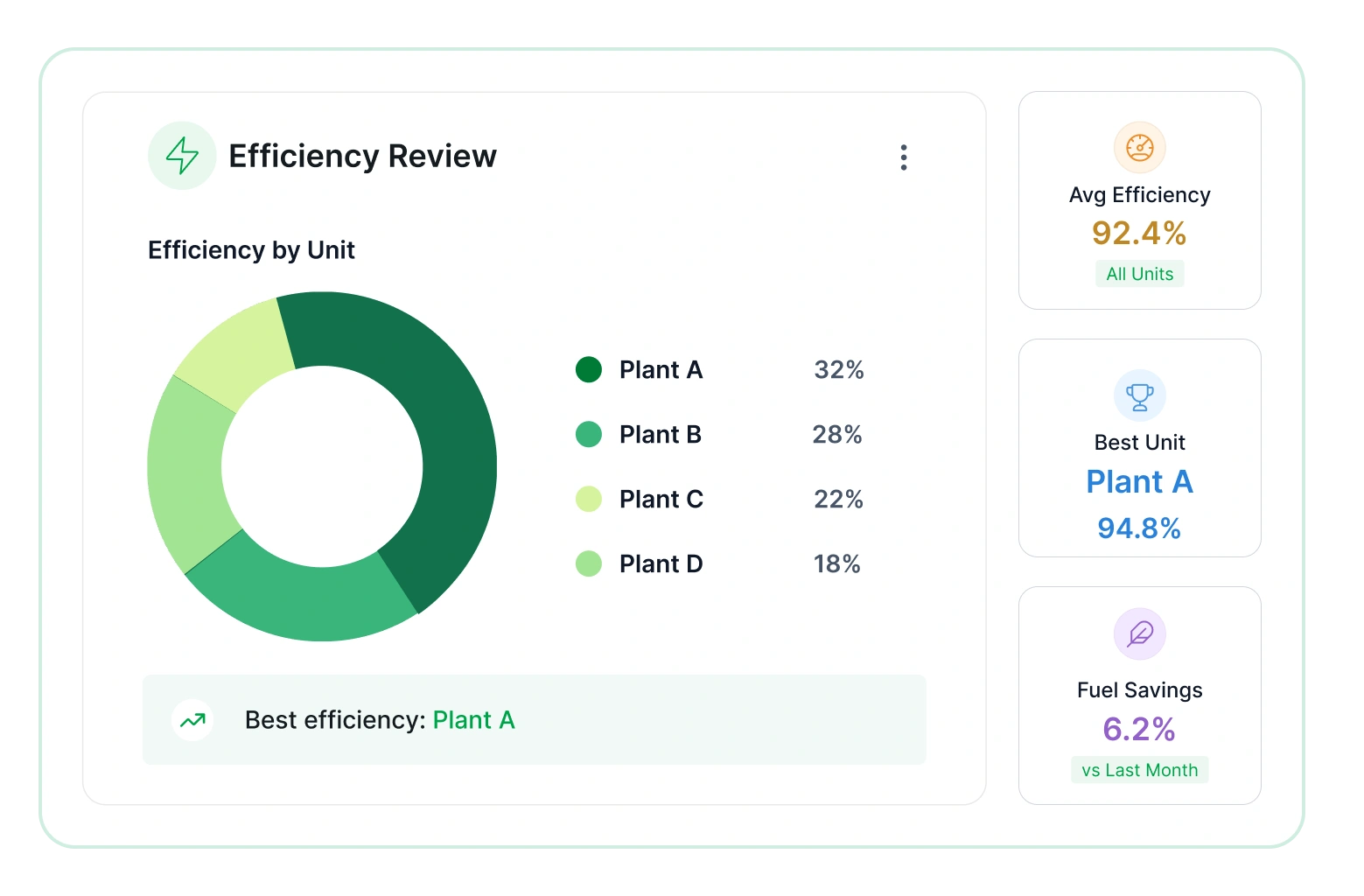
Efficiency review

Downtime summary

Provide visibility into equipment outages, maintenance activity, and production interruptions to support reliability improvements.

  • Track downtime across assets and facility locations.
  • Analyze outage frequency and duration across periods.
  • Detect recurring issues affecting system availability.
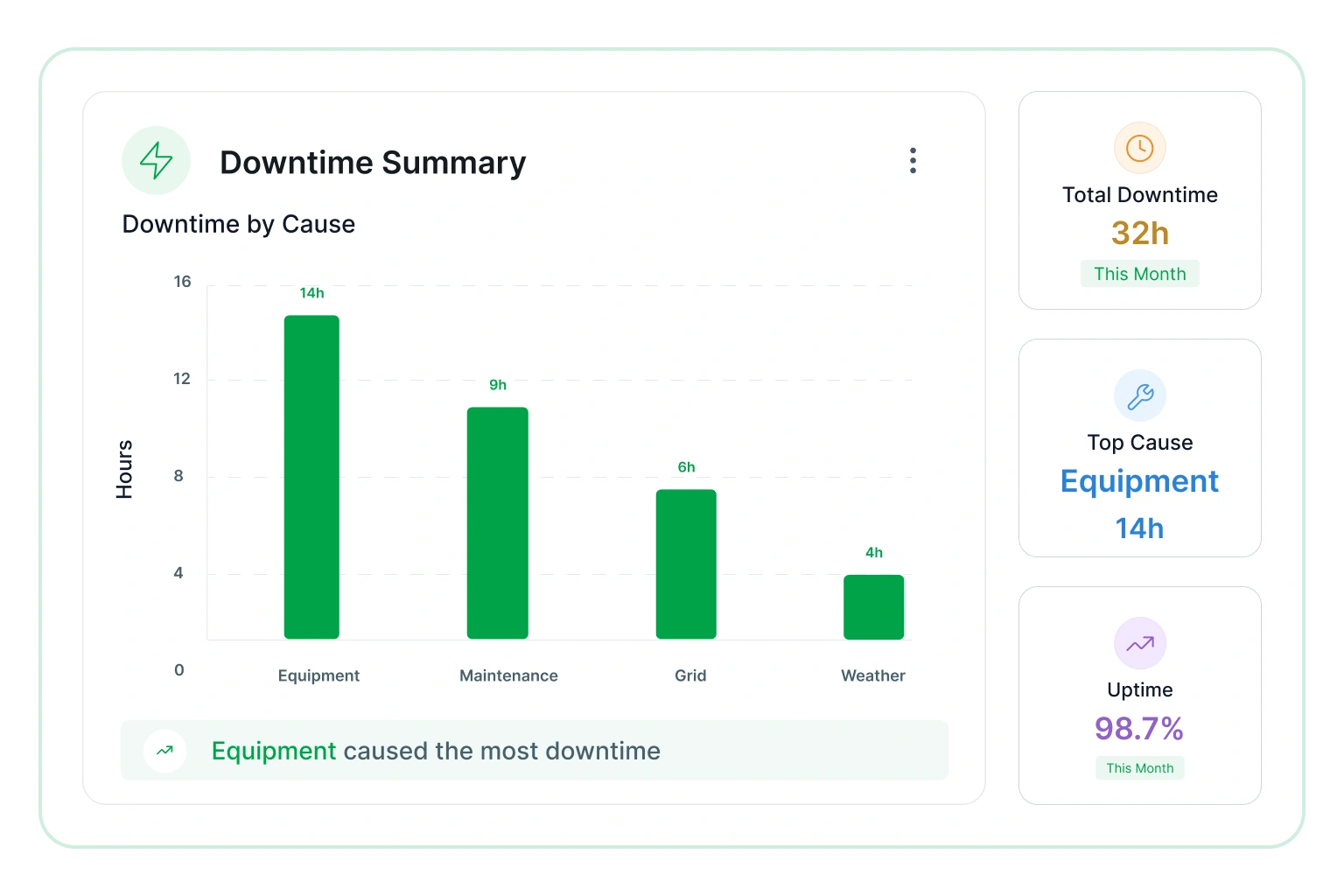
Downtime summary

Operations review

Develop a consolidated view of operational activity across plants, including production, maintenance, and resource utilization.

  • Examine performance across facilities and regional operations.
  • Monitor operational indicators supporting planning decisions.
  • Summarize activity for management reporting and reviews.
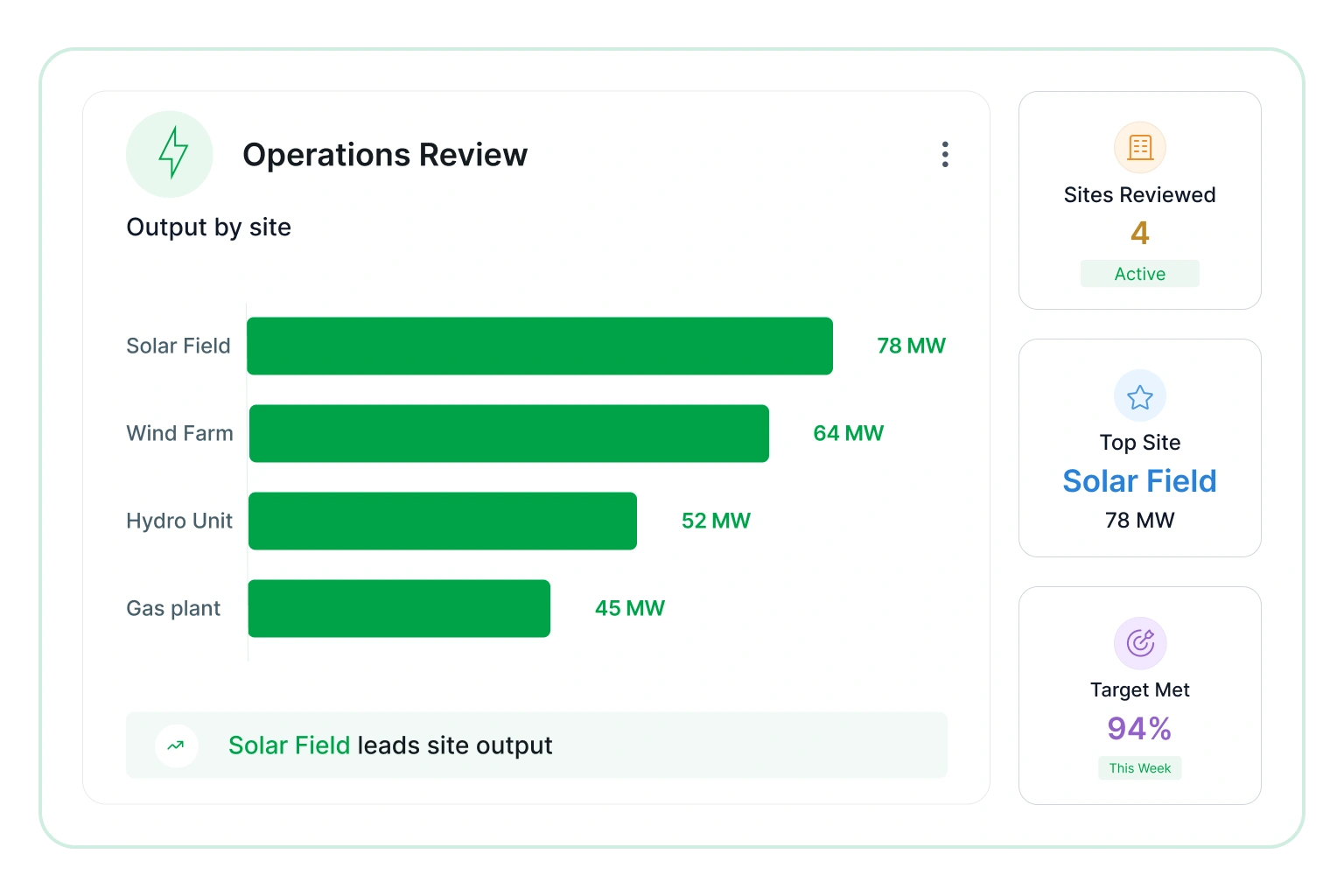
Operations review
Reporting workflow explained

How it works

Energy reporting combines plant, outage, meter, and maintenance data for recurring review, document preparation, and automated operational distribution. 

01

Connect

Bring plant, outage, meter, and maintenance records together for structured energy reporting.

02

Review

Examine output movement and maintenance activity in recurring energy documents.

03

Customize

Adjust filter, KPIs, and layouts to prepare energy documents for sites and leadership.

04

Share

Distribute energy reports through recurring delivery workflows for plants operation teams.

No credit card required.

Connectors

Data integrations

Connect to over 25+ data sources from files and databases to web services for flexible integration, transformation, and storage, all ready for reporting.

Templates

Energy report templates

Enhance energy operations by improving production efficiency, optimizing resource utilization, and ensuring system reliability through structured, data-driven reporting insights.

Power plant monitoring report template
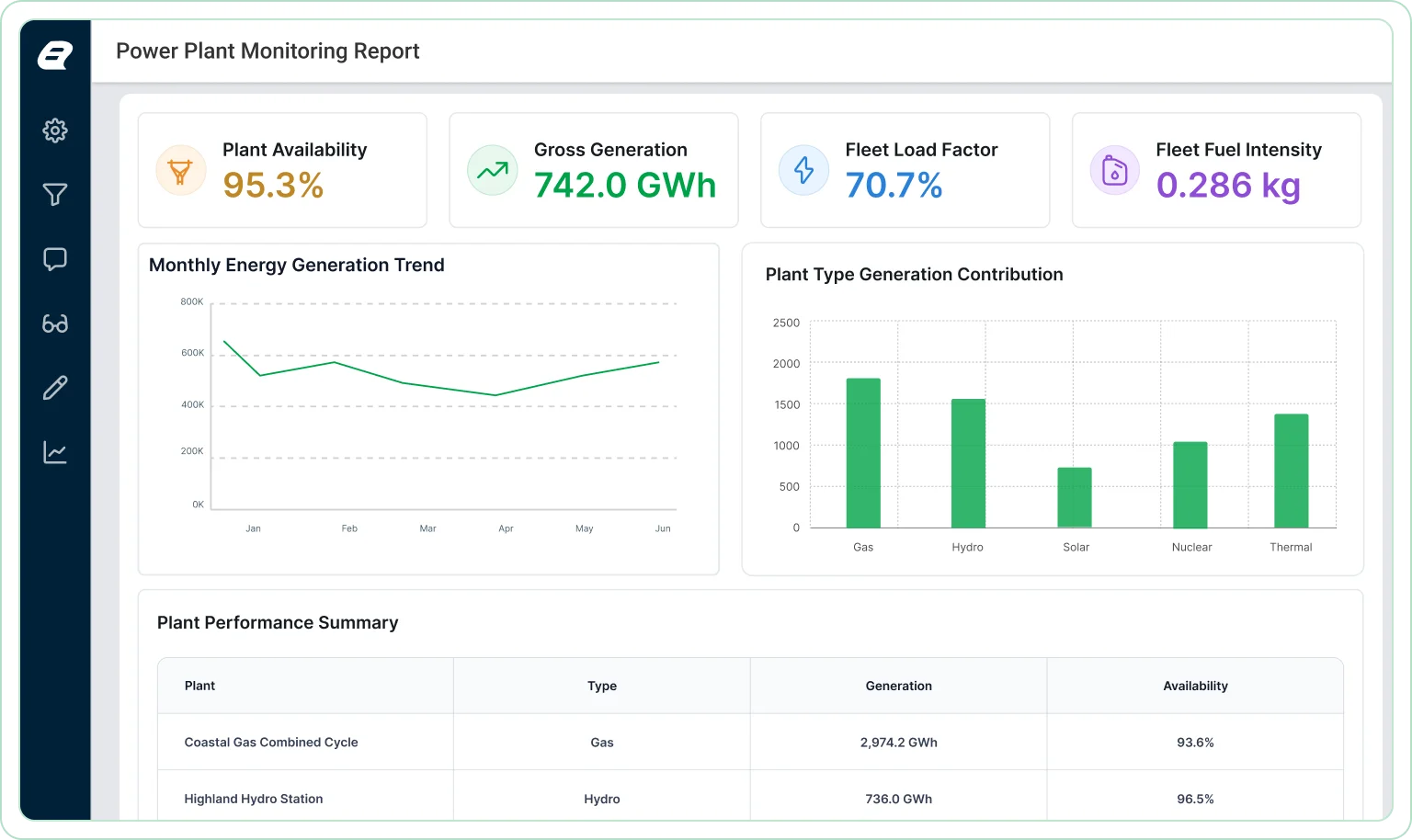
Power Plant Monitoring Report

Track power generation performance and operational efficiency.

Common reporting questions

Frequently asked questions

Learn how to report on energy production, consumption trends, operational performance, scheduling, and key metrics to support efficient monitoring and analysis.

Energy reporting software helps organizations prepare structured reports on generation output, plant efficiency, downtime, and utility operations. It supports recurring operational reviews and performance reporting. 

Yes. Energy reports can compare generation levels across facilities, generating units, and reporting periods to identify production trends and operational differences. 

Efficiency reporting helps teams evaluate generation performance, resource utilization, operational benchmarks, and areas where output improvements may be possible. 

Yes. Reports can include filters for plant, generating unit, shift, reporting period, region, and other operational dimensions. 

Yes. Automated report delivery helps distribute recurring operational reports to plant managers, analysts, maintenance teams, and leadership stakeholders. 

Common metrics include generation output, unit efficiency, downtime, outage duration, capacity utilization, maintenance activity, and operational performance trends.

Production-ready reports made easy

Turn your data into production-ready reports instantly

Create pixel-perfect, print-ready reports with powerful exporting and zero complexity.

No credit card required.